The Free Knight Online Macro
Built for Every Class
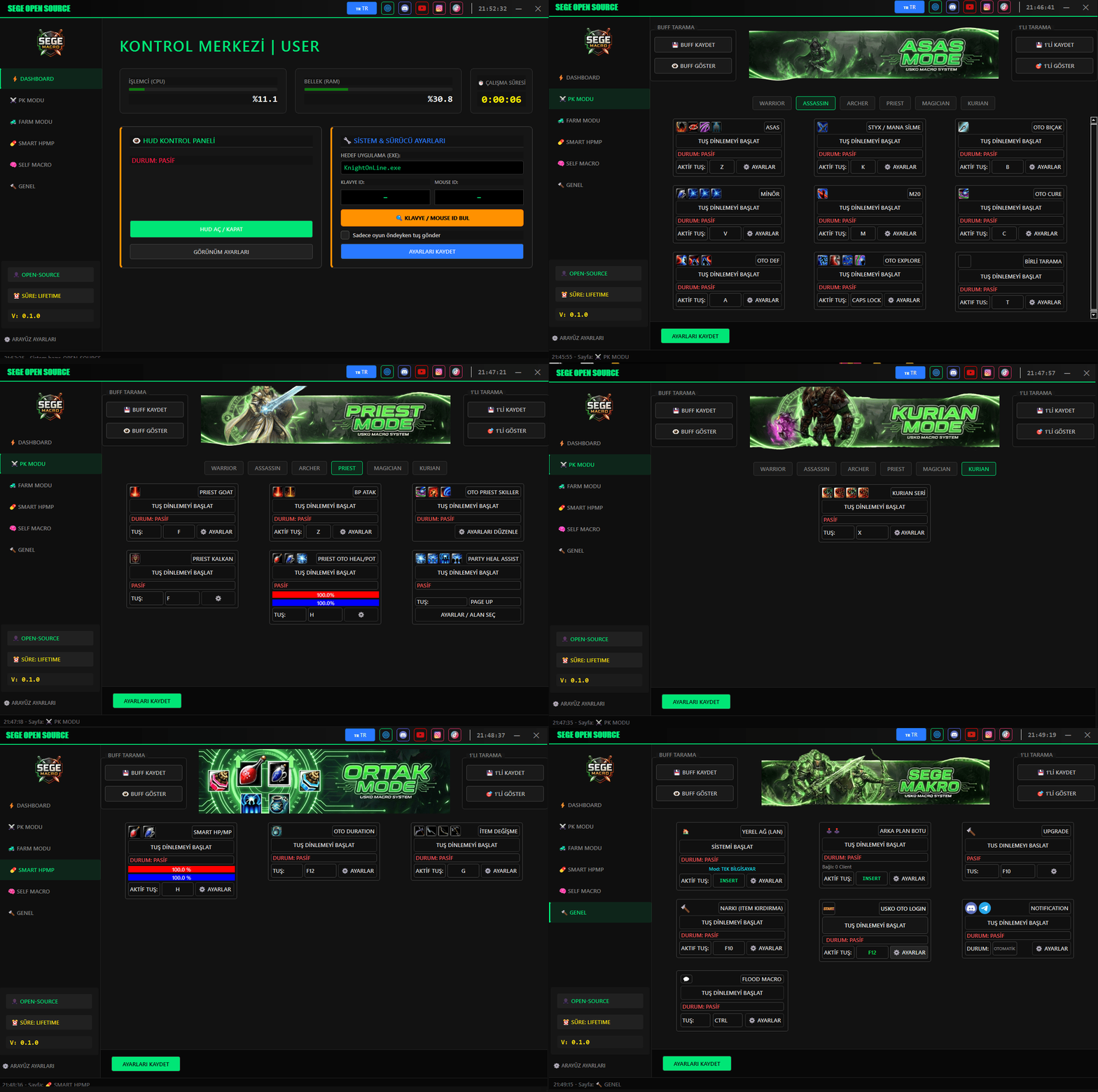
SEGE Macro is a free, open-source PyQt5 automation tool for Knight Online. It uses the kernel-mode Interception driver so your hotkeys work even in full-screen DirectX, with a dedicated module for every class — Warrior, Assassin, Archer, Priest, Mage and Kurian.
⚠ Educational use only. Automating input in online games may violate their Terms of Service.
[OK] Interception driver detected
[OK] icons/ loaded — 42 assets
[OK] hotkey bound: F → warrior.series_skill
[HP] 38% → potion queued (F1)
[MP] 61% → within threshold
[OK] smart_hpmp.module — active
status: running
Watch SEGE Macro in Action
A quick look at the tabbed interface, hotkey activation and the Smart HP/MP potting system running live.
Live demo: starting a macro with a hotkey and watching Smart HP/MP react in real time.
Why players choose SEGE Macro
A complete automation toolkit for Knight Online, free to download and easy to configure.
100% Free & Open Source
No license keys, no subscriptions. The full source is public so you can inspect exactly what it does.
Works in Full-Screen DirectX
Built on the open-source Interception kernel driver, so hotkeys reach the game even in exclusive full-screen mode.
Smart HP/MP Auto Pot
Tracks your HP and MP bars by screen region and automatically uses potions the moment they drop below your threshold.
A Macro for Every Class
Dedicated combo, cure, defense and farm macros for Warrior, Assassin, Archer, Priest, Mage and Kurian.
Auto Login & Notifications
Automatically reconnect after a disconnect, and get a Discord or Telegram alert the moment your character dies or drops.
Multibox & Custom Macro Editor
Control multiple game windows with one keyboard, or design your own step-by-step macro with the visual editor — no coding required.
How to use SEGE Macro
Install the driver, launch the app, assign a hotkey — you are ready to play.
1. Install the Interception driver
Download install-interception.exe, run it as Administrator with the /install flag, then restart your PC. This kernel driver is what lets hotkeys work inside full-screen Knight Online.
2. Launch SEGE_Macro.exe
No Python required — SEGE Macro runs standalone. Keep the icons/ and login_images/ folders next to the executable and run it as Administrator.
3. Pick a class tab and configure a macro
Open the Warrior, Assassin, Archer, Priest, Mage or Kurian tab, click the gear icon on any macro card, set your hotkey and combo, then hit Save.
4. Press your hotkey to start
Press the assigned key in-game to start the macro — the status changes to Active. Press it again, or click Stop, to turn it off. Multiple macros can run at once.
5. Set up Smart HP/MP potting
Select the on-screen region for your HP and MP bars, set a percentage threshold and the potion key, then save — the bot will auto-pot for you while you fight or farm.
Macro modules for every playstyle
Every macro ships as a self-contained module with its own hotkey and settings panel.
Warrior
- Series Skill ComboAutomated skill chain combos like 2rr or 456r on a single hotkey.
- Descend + Ground StrikeChains Descend into a ground-strike skill sequence.
- Head Strike HelperOne key to run the head-strike attack sequence.
- Shield ToggleEquip or remove your shield with a single hotkey.
- Debuff CleanseDetects and clears debuffs automatically while active.
- Spin AttackContinuous spin attack in toggle or hold mode, left or right.
- Crazy DescendAuto-Descend when HP drops below a set threshold.
Assassin & Archer
- Assassin ComboConfigurable skill-bar sequence for hybrid Assassin attacks.
- Mana Drain HelperAutomates Styx-style mana-drain skill timing.
- Auto Knife ComboRepeats a knife attack combo on a hotkey.
- 3-5 Archer ChainThe classic 3+5 skill chain with configurable delays.
- Ice / Mana / Light ReactionCombo helper for Ice, Mana Drain and Light Reaction.
- Auto Cure & DefenseAuto-cure on debuff and auto crowd-control escape.
Priest & Mage
- Priest Goat ModeHybrid attack + heal loop with book/staff switching.
- Auto Priest SkillerCycles multiple heal/buff skills automatically.
- Party Heal AssistantScans party HP bars and heals whoever is lowest.
- Mage Staff ComboStaff attack combo with configurable skill order.
- Auto Teleport EscapeCasts teleport automatically when HP drops too low.
- Chat-Triggered TeleportReads party chat for a keyword and teleports party members.
Smart HP/MP & Farm
- Smart HP/MP Auto PotScreen-region based HP/MP tracking with configurable pot keys and thresholds.
- Auto LootSweeps and collects nearby dropped items in a configurable pattern.
- Auto Repair & Weapon SwapMonitors weapon durability and swaps to a backup slot automatically.
- Pet Auto CareFeeds your pet and manages its HP/MP automatically.
- VIP / Clan Storage BotAutomatically deposits inventory items into VIP or clan storage.
General Tools
- Auto Login BotReconnects automatically after a disconnect using template-matching.
- Discord & Telegram AlertsSends a notification when your character dies or disconnects.
- MultiboxMirrors keyboard and mouse input across multiple game windows.
- V5 Self EditorA visual, no-code step editor for building your own custom macro.
- On-Screen HUDA transparent always-on-top overlay showing HP/MP and active macros.
Smart HP/MP setup guide
The most important module — five minutes to configure, hours of grinding saved.
Requirements
- Windows 10 or Windows 11 (64-bit)
- Interception driver (required for full-screen game input)
- Administrator privileges
- No Python installation needed — runs as a standalone .exe
Frequently asked questions
Is SEGE Macro really free?+
Yes. SEGE Macro is a free, open-source project. There are no license fees or hidden subscriptions.
Why do I need the Interception driver?+
Standard input APIs like SendInput cannot reach full-screen DirectX games. Interception is a kernel-mode driver that injects real keyboard/mouse events, so Knight Online sees them as genuine input.
Will this get my account banned?+
Automating input in an online game can violate its Terms of Service and may result in a ban. SEGE Macro is published for educational purposes — use it at your own risk.
My hotkeys are not doing anything, what do I check?+
Confirm the Interception driver is installed and your PC restarted, run SEGE_Macro.exe as Administrator, and make sure your hotkey does not conflict with an in-game key binding.
Can I run multiple macros at the same time?+
Yes — for example Smart HP/MP, a Warrior combo and Auto Cure can all run together as long as their hotkeys do not overlap.
Where do I download SEGE Macro?+
Use the download button on this page, or grab it from the official Knight Online forum thread linked in the Download section.
Download SEGE Macro for free
Grab the latest build from the official Knight Online forum thread, or visit the project site for full documentation.
⚠ Educational use only. The authors accept no responsibility for misuse or resulting account actions.